access
See the stage from your seat, in 360°
POV from any seat or standing spot, and from the stage, with the music, lightsticks and the show. Pay once, use it on 3 devices.
- Tap Get access and pay at least Rp15.000 (about RM4) on BagiBagi.
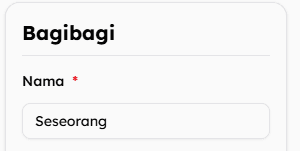
- In the Nama box, replace Seseorang with a unique name only you use, like
rina.monstiez.1411. - Come back here and enter that exact name within 30 minutes.
- Use a unique name, not just “Rina” or “MONSTIEZ”. It works like a password: anyone who types the same name can use your pass.
- Don’t pay as “Seseorang”. BagiBagi puts it in the Nama box for you (it means “someone”). Anonymous payments can’t unlock your pass.
Logged in to BagiBagi? Then your BagiBagi username is your name.
The venue map and categories stay free; the seat's position, distance to the stage and POV unlock with a pass. Fan-made simulation, not the real view.
Before you pay
BagiBagi is in Indonesian. Here’s what each box means, top to bottom.
-
Nama = name. Delete Seseorang (“someone”) and type a unique name only you use. It’s your login here.
Not just “Rina” or “MONSTIEZ”: anyone who types the same name can use your pass.
Email = your email, for the receipt.
Jumlah BagiBagi = amount. Keep 15.000 (≈ RM4) or more.
Pesan = message. Optional, you can leave it empty.
Metode Pembayaran = payment method. Tap QRIS, then pick South East Asia.
Tick syarat dan ketentuan (terms and conditions), then tap the pay button. A QR code appears.
- Malaysia DuitNow QR: Maybank MAE, Touch ’n Go, CIMB, Public Bank, RHB, Hong Leong, Boost & more
- Singapore NETS QR: DBS PayLah!, OCBC, UOB
- Thailand PromptPay: K PLUS (Kasikorn), SCB, Krungthai, Bangkok Bank, Krungsri, CIMB Thai